


Hello friends, In the AI world of coding tools, Google has introduced its new brand platform which is Google Antigrivity. Many experts comparing it with popular AI coding IDEs like Cursor, Windsurf, and VS Code-based AI tools. But instead of simply calling it a “Cursor Killer” or “VS Code Killer,” it is better to understand what this tool actually offers and how useful it can be for developers.
So get ready because in this article we will explore the features of Google AntiGravity, how it works, its strengths, its weaknesses, and whether it can truly change the future of software development.
What is Google AntiGravity?
Google Antigravity is an AI-powered coding IDE that uses intelligent agents to help developers build applications. It combines coding assistance, planning, browser automation, image generation, and debugging into one platform.
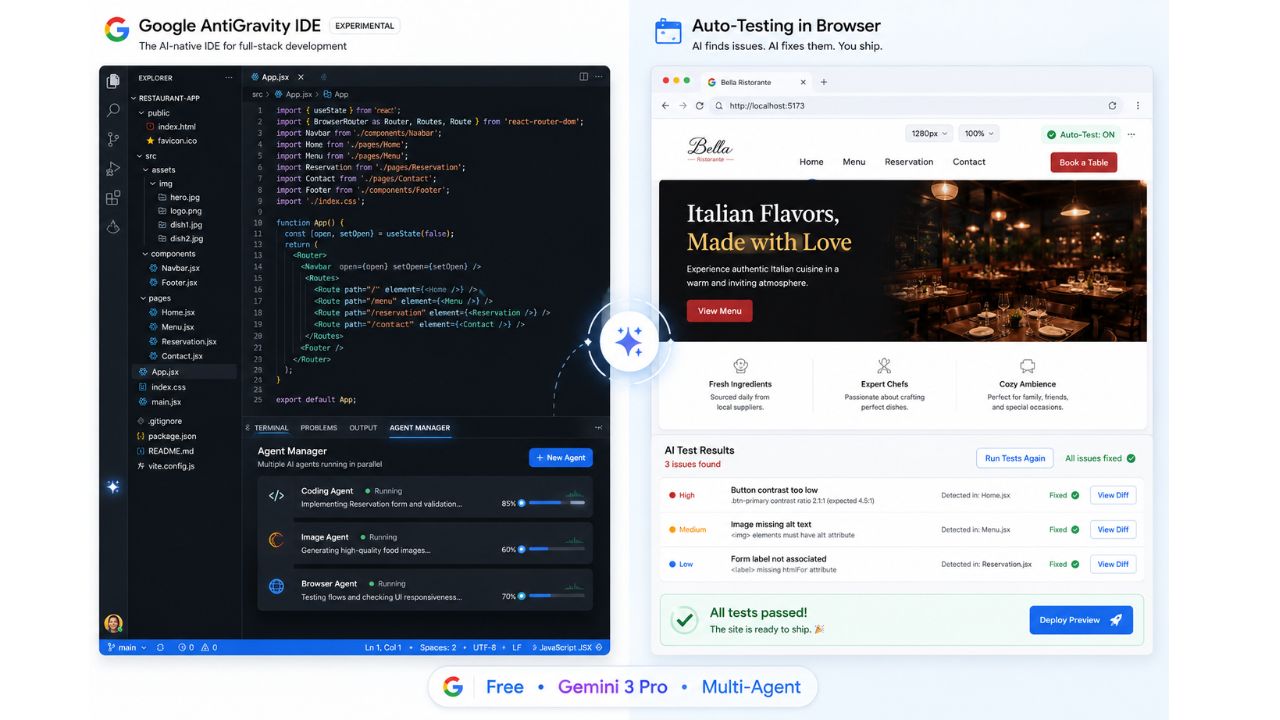
Currently this tool is free to use and comes with powerful AI models such as Gemini 3 Pro and Nano Banana Pro for advanced coding and design generation. The installation process is very simple. Users can download the IDE, install it like a normal application, sign in using their Google account, and start coding immediately.
Different Working Modes in AntiGravity
One of the most interesting features of the AntiGravity is that it offers multiple AI working modes depending on how much control you want to give to the AI agent.
1. Agent-Driven Development
In this mode, the AI agent works almost completely independently. It performs tasks automatically without constantly asking for approval.
2. Agent-Assisted Development
Here, the AI occasionally asks for reviews and confirmations while working.
3. Review-Driven Development
This mode gives more control to the user. The AI asks for approval more frequently before making changes.
4. Custom Configuration
Users can fully customize how the AI behaves and when it should ask for permission. This flexibility makes the IDE suitable for both beginners and experienced developers.
Planning Mode vs Fast Execution Mode
AntiGravity also provides two important execution styles:
1. Planning Mode
In this mode, the AI first creates a detailed implementation plan before writing code. It thinks carefully and improves accuracy.
2. Fast Execution Mode
This mode starts coding immediately for quicker results. However, the accuracy may be lower compared to planning mode. For complex projects, planning mode is highly recommended because it produces more organized and reliable outputs.
AI-Powered Website Creation
One of the most impressive features demonstrated in AntiGravity is its AI-generated website development. For example, when the AI was asked to: “Create a React app for a restaurant and generate homepage design variations.” Within minutes, its the tool started generating multiple homepage concepts automatically using AI-generated artifacts. The user can review different design options, select the preferred one, and ask the AI to continue development based on that design. This makes the development process much faster and easier, especially for frontend development.
Smart AI Planning System
Before coding begins, AntiGravity creates a full development roadmap. For example, while building the restaurant app, the AI automatically planned:
- Homepage development
- Menu page creation
- Reservation page
- Contact page
- About page
- Team page
Users can even comment on the AI’s plan and request additional features before execution starts. This collaborative planning system feels very advanced and useful.
Agent Manager: Multi-Tasking with AI
Another powerful feature is the Agent Manager. Using shortcuts like Ctrl + E, users can open the Agent Manager and run multiple AI tasks simultaneously.
For example:
- One AI agent can generate a website
- Another agent can create food images
- Another can organize folders and assets
All these tasks run in parallel without interrupting each other. This significantly improves productivity.
AI Image Generation Inside the IDE
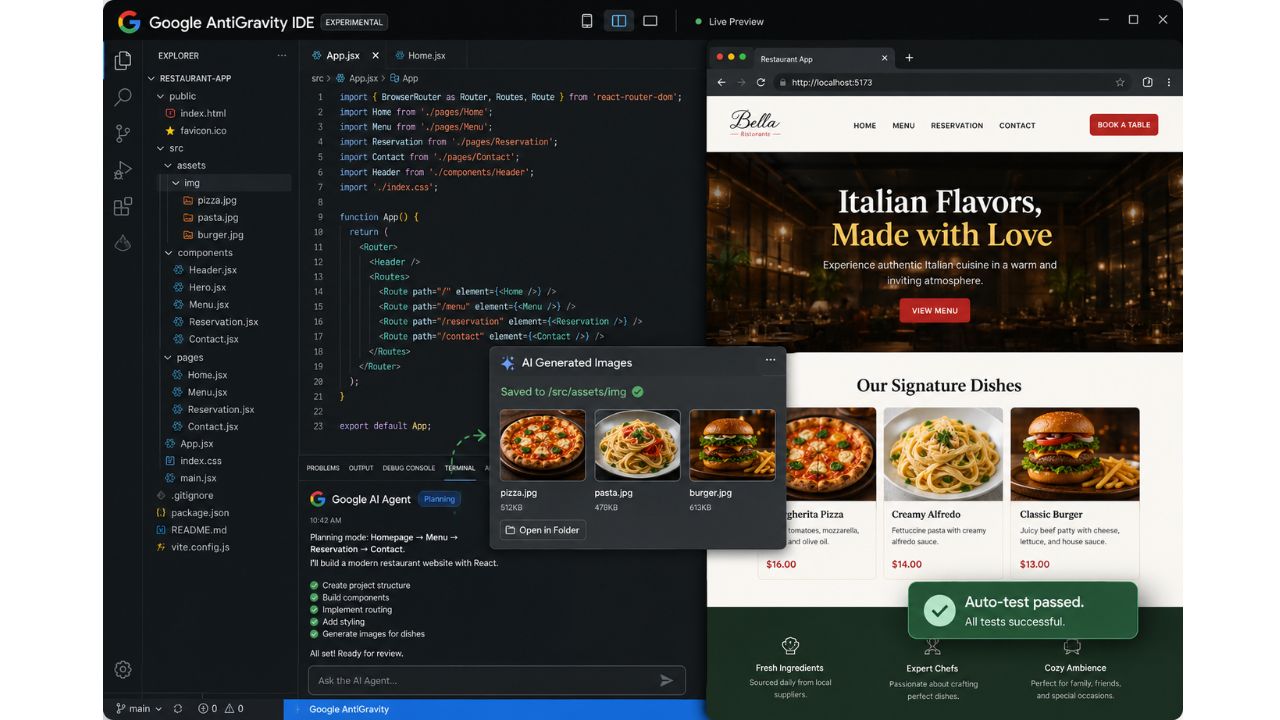
AntiGravity can even generate images directly inside projects. For example, the AI was asked to: “Create high-quality food item images and save them inside the IMG folder.” The AI automatically generated images like:
- Pizza
- Pasta
- Burgers
And stored them in the correct project folder. This feature is extremely useful for developers who need quick design assets during development.
Browser Automation and Testing
One of the biggest innovations in AntiGravity is browser integration. The IDE can open a browser, install its extension, launch the web application, and test it automatically.
The AI agent can:
- Navigate through pages
- Detect frontend errors
- Read browser logs
- Take screenshots
- Analyze DOM elements
- Fix issues automatically
This is a major improvement compared to traditional AI coding tools because most tools only understand terminal logs, not browser behavior.
By combining:
- Frontend logs
- Backend logs
- Browser screenshots
- DOM analysis
Google’s AI creates a much smarter debugging system.
Custom Rules and Personalization
Users can also create custom development rules.
For example:
- Use purple color theme
- Follow specific UI guidelines
- Apply custom design systems
These rules are saved and automatically followed by the AI during future development. This makes the tool highly customizable.
Weaknesses and Problems
Although AntiGravity is powerful, it is not perfect. Several issues were noticed during testing:
1. Weak UI Design Quality
The generated website designs were not always polished. Some layouts looked incomplete or visually weak.
2. Browser Profile Limitation
The AI opens a separate browser profile instead of using the user’s personal Chrome profile.
3. Error Detection Issues
Sometimes the AI fails to properly detect console errors and may enter repetitive debugging loops.
4. Inconsistent Styling
Some UI elements may break or disappear after updates and fixes. So while the tool is impressive, it still requires improvements.
Is AntiGravity a VS Code or Cursor Killer?
The simple answer is: No. AntiGravity is not a “killer” for Cursor, VS Code, or Windsurf. It is simply another strong competitor in the AI coding market. Tools like Cursor have years of experience, large datasets, and mature ecosystems. Google’s AntiGravity is still in its early stages. However, the competition is good for developers because it pushes companies to create better AI tools.
Will AI Replace Developers?

This is one of the biggest questions today. The answer is: Not anytime soon. AI tools like AntiGravity are designed to assist developers, not replace them completely. Human creativity, problem-solving, experience, and decision-making are still extremely important. AI can speed up coding and automate repetitive tasks, but developers who continue learning fundamentals will always stay valuable.
Final Thoughts
Google AntiGravity is an exciting new AI coding IDE with powerful automation features. Its ability to combine:
- AI coding
- Planning
- Browser testing
- Image generation
- Multi-agent workflows
makes it one of the most innovative tools currently available. Even though it still has bugs and design limitations, its future looks very promising. For developers, the best approach is not to fear these tools, but to learn how to use them effectively. AI will continue evolving, and developers who adapt early will benefit the most.