

Introduction
The application process for the Bihar Public Service Commission (BPSC) 72nd Exam Combined Competitive Examination (CCE) 2026 has officially started. Thousands of candidates from across Bihar are preparing to apply for this prestigious government recruitment exam.
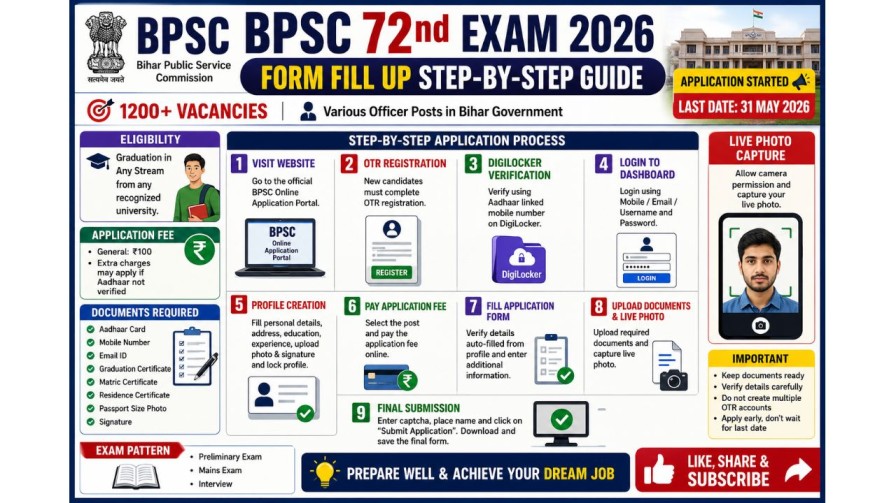
This recruitment offers around 1200 vacancies for different officer-level posts in the Bihar government. Candidates who have completed graduation in any stream are eligible to apply. The last date to submit the online application form is 31 May 2026.
Many students find the online form process confusing because it includes OTR registration, DigiLocker verification, fee payment, profile creation, live photo capture, and document upload. In this article, we will explain the complete process in easy and simple English so that candidates can fill out the form without mistakes.
What is BPSC 72nd CCE Exam?
The BPSC 72nd Exam Combined Competitive Examination is conducted by the Bihar Public Service Commission for recruitment to various administrative posts in Bihar.
Selected candidates can get positions such as:
- Block Development Officer (BDO)
- Circle Officer (CO)
- Revenue Officer
- Deputy Superintendent of Police (DSP)
- Child Development Project Officer (CDPO)
- Other state administrative posts
This is one of the most respected state government examinations in Bihar.
Important Dates
Application Start Date
The online application process has already started.
Last Date
The final date to submit the application form is:
31 May 2026
Candidates are advised not to wait until the last date because server issues may occur.
Eligibility Criteria
Educational Qualification
Candidates must have completed graduation from a recognized university in any subject.
Students from Arts, Science, Commerce, Engineering, or any other stream can apply.
Application Fee
The application fee for the BPSC 72nd exam is:
- ₹100 for General category candidates
- Additional charges may apply if Aadhaar verification is not completed
If candidates apply for multiple posts like CDPO along with CCE, separate fees may be charged for each post.
Step 1: Visit the Official Application Website
Candidates need to open the official BPSC online application portal.
The form can only be filled online.
Before starting the form, candidates should keep these documents ready:
- Aadhaar card
- Mobile number linked with Aadhaar
- Active email ID
- Graduation certificate
- Matric certificate
- Residence certificate
- Passport-size photo
- Signature
Step 2: Complete OTR Registration
What is OTR?
OTR means One Time Registration.
Candidates who already created OTR during the 71st BPSC exam do not need to create it again.
They can directly log in using:
- Mobile number
- Email ID
- Username
- Password
New candidates must first complete OTR registration.
How to Create OTR
Candidates need to enter:
- Email ID
- Mobile number
- Name
- Father’s name
- Mother’s name
- Date of birth
- Gender
- Password
After entering the details:
- Verify mobile OTP
- Verify email OTP
- Click on “Preview and Register”
The system then redirects candidates to DigiLocker verification.
DigiLocker Verification Process
Candidates must log in to DigiLocker using Aadhaar-linked mobile number.
After OTP verification, permission must be granted to BPSC for authentication.
Once completed, the OTR account becomes active.
Step 3: Login to Dashboard
After successful OTR registration, candidates can log in using their credentials.
The dashboard will show:
- Candidate profile
- Application options
- Previous application details
Before filling the form, candidates should carefully check all profile information.
Step 4: Complete Profile Creation
Candidates must complete their profile before applying.
The profile section includes:
- Personal information
- Address details
- Educational qualification
- Experience details
- Reservation details
- Photo upload
- Signature upload
After filling everything correctly, candidates should lock the profile.
Once locked, the OTR process is completed.
Step 5: Check and Update Profile
Before filling the BPSC 72nd Exam form, candidates should review all information carefully.
If there is any mistake, they can use the “Unlock Profile” option to edit details.
Important Note:
After submitting the final application form, profile corrections may not affect the submitted application. Therefore, candidates should verify all information before proceeding.
Step 6: Pay the Application Fee
After clicking on “New Application,” candidates will see the available exams.
They can select:
- BPSC 72nd Exam CCE
- CDPO
- Or both
After selecting the desired post, candidates must pay the application fee through:
- UPI
- Debit card
- Credit card
- Net banking
Once payment is successful, the “Apply” button becomes active.
Step 7: Fill the Application Form
Most information is automatically fetched from the OTR profile.
Candidates only need to verify details and fill additional information.
Important details required include:
- Previous BPSC attempts
- Matric certificate number
- Graduation certificate number
- Certificate issue dates
Address Details Requirement
Candidates must provide addresses where they stayed for more than six months during the last three years.
They need to mention:
- Full address
- From date
- To date
Even home or village addresses can be entered if applicable.
Reference Details
Candidates must provide details of two persons who know them personally but are not relatives.
Information required:
- Name
- Full address
Friends or known persons can be listed as references.
Step 8: Upload Documents
Candidates must upload:
- Matric certificate
- Residence certificate
The file size should be below 150 KB.
Step 9: Live Photo Capture
One unique feature of the BPSC form is live photo capture.
The system opens the webcam, and candidates must:
- Allow camera permission
- Position face correctly
- Capture live image
This step is mandatory.
Final Submission
After uploading documents and capturing the live photo:
- Tick the declaration checkbox
- Enter captcha code
- Mention place name
- Click “Submit Application”
Once submitted successfully, the application process is complete.
Candidates should download and save the final application form for future reference.
Important Tips for Candidates:-
1. Do Not Create Multiple OTR Accounts
If you already have an OTR account, use the same account instead of creating a new one.
2. Keep Documents Ready
Prepare scanned documents before starting the form process.
3. Verify Details Carefully
Check all spelling, certificate numbers, and dates properly before final submission.
4. Complete the Form Early
Avoid waiting until the last date to prevent technical problems.
Conclusion
The BPSC 72nd Exam CCE 2026 application process may look complicated at first, but it becomes simple when completed step by step. Candidates must carefully complete OTR registration, DigiLocker verification, profile creation, fee payment, and final submission.
This examination is a golden opportunity for Bihar students who want to build a strong career in government administration. With proper preparation and correct application submission, candidates can move one step closer to achieving their dream job.